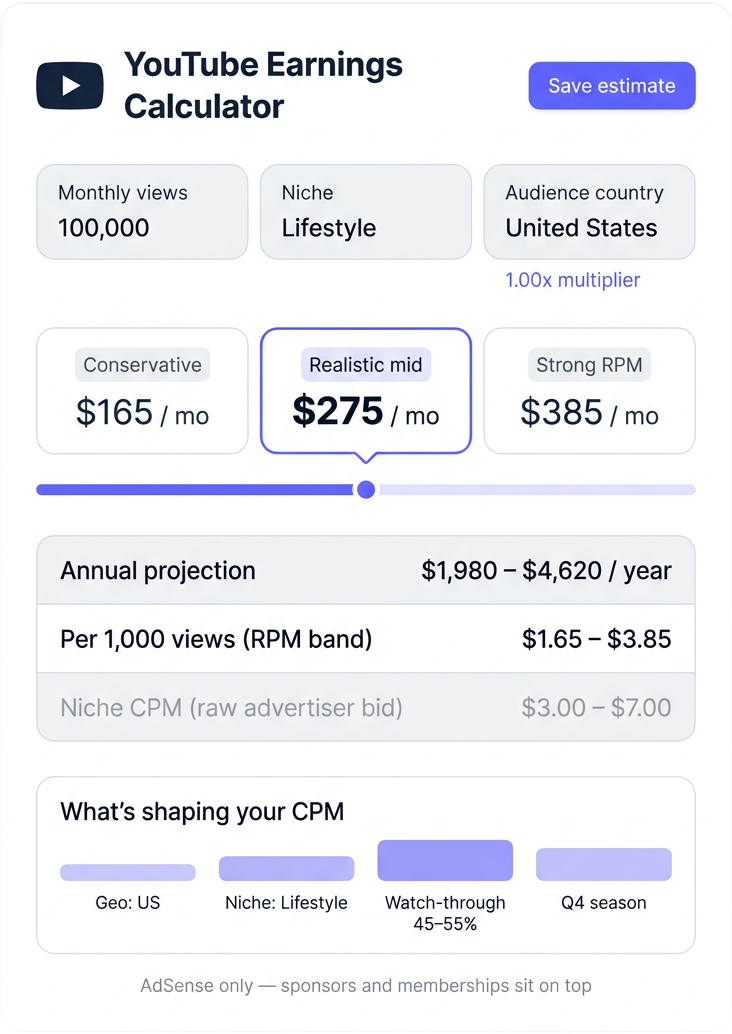
Drop in your monthly views, niche and audience country. The calculator returns a realistic low-mid-high earnings band, an annual projection, and the per-thousand view rate the math is built on.

Pick views, niche, and audience country to get a low / mid / high band in seconds.
Monthly band, annual projection, per-thousand view rate, plus the niche and geography signals shaping the math. All in one panel, no signup.
Three numbers instead of one fake-precise figure — so you can plan against the cautious case, the realistic case, and the upside.
Auto-multiplied across twelve months so you can sanity-check whether your traffic curve covers the runway you're aiming for.
The same dollars-per-thousand-views number that lives in YouTube Studio, surfaced before you ever monetize.
A US-heavy audience and an India-heavy audience can earn five-fold apart for the same view count. The country picker reflects that.
Finance pays differently from gaming, beauty differently from kids. Pick one and the CPM band updates against published 2026 ranges.
No account, no email field, no upsell pop. The math runs in your browser the moment you press Calculate.
Monthly views, niche, geo — the channel earnings band runs in real time.
Total monthly channel views (last 30 days, or your forecast). Commas, k and M suffixes all parse cleanly.
Niche sets the CPM band, country sets the multiplier, then the standard 55 percent creator share applies before the band lands.
Monthly low/mid/high tier ranges land in the result card with the annual projection automatically computed underneath.
CPM, geography, watch-through and seasonality. The calculator surfaces the first two; this section explains why the other two matter just as much.
Advertisers pay more to reach viewers their product can actually convert. Finance, B2B and high-ticket tech viewers carry buying intent and customer lifetime values measured in thousands — so brokers, banks and SaaS companies bid aggressively. Vlogs and entertainment carry attention but rarely transactional intent, so the same view earns a fraction.

A view bought in California competes for the same ad slot as one bought in Lagos, but the advertiser pool, currency and purchasing power are different worlds. The calculator applies a country factor derived from published RPM disclosures — US sits at the top, India and Southeast Asia at the bottom, with the UK, Canada and Australia clustered close behind the US.

An eight-minute video earns nothing on its second ad slot if half your viewers leave at minute four. Watch-through rate is the single editorial lever you fully control — tighter pacing keeps viewers in seat past the mid-roll insertion points, and every served impression compounds the RPM. The calculator assumes a healthy forty-five to fifty-five percent band; raising it to seventy unlocks the high end of the result.

Brand budgets get cleared in the final quarter. Black Friday, Cyber Monday and holiday gifting force advertisers to deploy unspent budget before the calendar resets, so the same impressions auction higher. January through March is the inverse — budgets reset, bidding cools, and RPMs compress. Plan launch dates and big releases around the Q4 lift instead of around your own publishing convenience.

YouTube earnings split into two layers — the AdSense base that pays automatically once a channel crosses monetization, and the everything-else layer that grows with audience trust. This calculator models the first layer because it is the one driven by hard public CPM data; the second is creator-specific and not estimable from view count alone.
The dollars an advertiser pays per thousand ad impressions delivered. CPM is gross, paid into YouTube. Your share — RPM — is roughly fifty-five percent of CPM after the platform's standard revenue cut, before tax.
Advertisers pay to reach buyers in their addressable market. A US viewer carries higher expected purchase value than the global average, so US-heavy audiences earn many times more for the same view count than emerging-market audiences.
A finance channel with US viewers stacks the highest CPM band on the strongest multiplier. A kids channel with SEA viewers stacks the lowest band on the smallest multiplier. The spread between the two ends of that grid is roughly fifty-fold per thousand views.
Sponsorship slot fees, channel memberships, Super Chat, affiliate revenue, merch margin and your own product sales. These are usually larger than AdSense once a channel finds its audience — but they cannot be estimated from views alone.
Different slices of one earnings model — one input form, seven distinct outputs you can act on.
A three-point estimate, not a single fake-precise number — conservative, realistic and strong-RPM cases for the same view count.
The monthly band multiplied across twelve months, so you can sanity-check the runway you are building toward.
The same dollars-per-thousand-views number YouTube Studio reports — calculated before you ever cross the monetization threshold.
See exactly what factor your audience country applied. Switching audience mix swaps the multiplier and reshapes the band instantly.
The raw advertiser CPM band sitting behind your RPM — useful for sanity-checking against your real Studio numbers.
Plain-language signals on geo tier, niche tier and watch-through — the three knobs that decide whether your real number lands at the low or high end of the band.
The calculator only models AdSense. Sponsorships, memberships, affiliate and merch sit on top of these bands — we tell you that up front instead of hiding it.
| What you actually want to know | Generic estimators | This calculator |
|---|---|---|
| Niche-specific CPM bands | One flat figure | Ten niches |
| Geographic multiplier exposed | Hidden or skipped | Nine regions |
| Three-band output, not one number | Single point | Low, mid, high |
| Annual projection auto-built | Manual math | Auto-computed |
| Account or paywall to access | Signup or subscription | Open access |
| Cost to run a scenario | Paid tier required | Free, forever |
Pressure-testing whether the current view trajectory will cover salary, gear and freelancer costs before quitting the day job.
Sizing client AdSense floors before quoting sponsor packages, so the deck shows realistic ad income alongside brand-deal projections.
Modeling next-quarter revenue for the channel-as-a-business, including tax provisioning and reinvestment headroom.
Cross-checking a creator's stated rate card against the implied AdSense floor — if the rate card is wildly off, the deal needs renegotiation.
Reverse-engineering the view count needed to make YouTube viable as a primary income line in a chosen niche and geography.
Five clean stages between your input form and the earnings band on screen.
Monthly views, niche choice and audience country — nothing else needed, nothing sent to a server.
Published 2026 CPM ranges per niche — finance at the top, kids at the bottom — loaded as the working low and high bound.
Country factor scales the CPM band — one-times for US down to roughly point-two-times for emerging markets.
The CPM band is converted to creator-take RPM using YouTube's standard fifty-five percent payout to the channel.
RPM times your view count gives monthly low and high; midpoint averages them; the annual row multiplies by twelve.
“Plugged in last month's 480K views, picked Tech and US audience, got a band that matched my actual Studio number within ten dollars. That's closer than the paid estimators I was using.”
“We model floor revenue for ten talent partners every Monday morning. This page replaced three SocialBlade tabs and a spreadsheet. The three-band output is what closed the deal internally.”
“The geography multiplier is the thing nobody else surfaces. We finally have a number to point at when a client argues their RPM looks low — their audience mix is the answer, not their content.”
Three inputs above. Three bands below. Free forever, no signup, no upsell — the math runs in your browser.
Run a small gaming channel — used the revenue calculator and SEO analyzer the same week. The SEO tool flagged that my titles were under-optimized. Renamed three videos, saw views jump 40% over the next 30 days.
Monetization checker confirmed my channel met all the policies before I applied. Saved me an awkward rejection from YouTube. Worth its weight.
Shorts revenue calculator gave me an honest range — small for new shorts, real for proven ones. Other tools just hype the number to make creators dream.
Video lifecycle analyzer changed how I plan content. Showed me how my old videos still pulled views years later. Started making more evergreen pieces because of that data.
Solid toolkit. Would love the retention-rate estimator to factor in audience age more carefully, but the data is still very useful for content tweaks.
Cross-platform agency here. We use the revenue calculator for client budget conversations. The estimates land within reasonable margins of actual reported earnings.
SEO analyzer pointed out that my video descriptions were missing keywords the title implied. Quick fix, real impact on impressions.
Money calculator gave a defensible number for a sponsor pitch. Got the deal. The platform stopped paying me as well last year so external estimators matter now.
Useful suite. Would love a "compare two videos" mode for the SEO analyzer, but the single-video analysis is already detailed.
Retention-rate estimator helped me see why a specific video underperformed. Hooks dropping at the 8-second mark. Re-edited and republished, doubled retention.
Monetization checker is honest — told me my new channel was not eligible yet and exactly which criteria I was missing. Better than YouTube's own opaque process.
No paywall. No upsell. Free YouTube tools that actually give real numbers. Filipino creators thank you.